How to Optimize Your Google Business Profile for Local SEO in Kelowna

Updated: Jul 14

If you’re trying to improve your visibility in local search, learning how to optimize your Google Business Profile for local SEO in Kelowna is one of the highest-impact things you can do.
Google has found that businesses with complete and accurate Google Business Profiles are 2.7x more likely to be considered reputable, and significantly more likely to attract visits, calls, and customer actions like website clicks and direction requests.
This post builds on my earlier guide on how to create a Google Business Profile, and focuses on how to actually optimize your Google Business Profile so it supports your local SEO visibility and turns more profile views into real leads. If you haven’t set yours up yet, start with my guide on how to create your Google Business Profile before diving into the optimisation in this post.
I see this constantly with service-based businesses I work with—financial professionals, mortgage brokers, and trades in Kelowna. They’ve set up their profile, filled in the basics, and then… nothing. No updates, no strategy, no real optimisation.
And then they wonder why competitors are showing up above them in Google Maps.
The truth is: your Google Business Profile is not a “set it and forget it” listing. It’s a ranking asset and a lead generation tool. And most businesses are using maybe 20% of its potential.
Note: A well-optimized Google Business Profile can absolutely improve your visibility in Google Maps, but it won't magically fix a weak website. The businesses that tend to dominate local search usually have both: a strong Google Business Profile and a website that's been built to support their local SEO goals.
Table of Contents
How to Optimize Your Google Business Profile Checklist
First, understand what your Google Business Profile actually is

Your Google Business Profile is a snapshot of your business inside Google Search and Maps.
For Kelowna service businesses—especially in competitive industries like legal, accounting, real estate, mortgage, and trades—this is often where people decide whether they trust you enough to click through or call.
So optimization isn’t about tricks. It’s about clarity, relevance, and consistency.
1. Get your categories right (it matters more than you think)

This is one of the biggest ranking signals inside your profile.
Most Kelowna businesses either:
pick something too generic
or choose based on how they describe themselves, not how clients search
You want:
Primary category = your main revenue service
Secondary categories = supporting services people actually search for
Examples:
Lawyer → “Personal Injury Attorney” or “Family Law Attorney” (not just “Lawyer” if more specific titles apply)
Accountant → “Tax Preparation Service” + “Accounting Firm” (not “Tax Preparation Kelowna”)
Realtor → “Real Estate Agency” or “Real Estate Agent”
Mortgage Broker → “Mortgage Broker”
Trades → “Electrician”, “Plumber”, “General Contractor”
If your category is vague or uses hyper-markety, branded language, it’s going to make it harder for customers to actually find you.
2. Rewrite your business description for search clarity (no fluff, please)

Most business descriptions read like this: “We are a passionate, client-focused company committed to excellence…”
Google doesn’t rank passion. It ranks relevance.
And, more importantly, it sounds generic and irrelevant to potential clients.
A strong description should clearly include:
what you do
who you help
where you work (Kelowna + surrounding area if relevant)
what outcomes you provide
If you have a brand script or messaging, this can be a great place to use it.
Example (for a Kelowna web design client):
“We provide website design and SEO strategy for service-based businesses in Kelowna, including lawyers, accountants, real estate agents, mortgage brokers, and trades. Our focus is building websites that generate leads and improve local search visibility.”
Clear > clever.
In fact, language that’s too salesy or “marketing-heavy” can get your profile flagged or even suppressed in search results. Google wants clear, straightforward descriptions written in neutral language. If your description feels overly braggy or includes subjective claims like “best Realtor in Kelowna,” it’s also more likely to be flagged.
3. Optimize your services section like it’s SEO content

This is where most businesses completely underuse their profile.
Don’t just list vague services. Structure your services like the search terms people are using.
Instead of:
“Web Design”
“SEO”
Use:
Website Design for Service Businesses
Local SEO Setup for Google Business Profiles
Lead Generation Website Strategy
Website Redesign for Law Firms / Realtors / Trades
Think of this section as supporting your local keyword footprint.
But remember, keep service names direct and straightforward. This is not the place for buzzwordy or markety language. Think of your services as words or phrases people are actually searching for.
Don’t add the city to your services either. Your location is already determined by your office location or service areas. Adding a city to your services looks spammy to Google.
One more tip: don't just stop at adding service names. Take the extra few minutes to write a description for each service as well. This gives Google more context about what you do and helps potential customers quickly understand whether you're the right fit.
For example, instead of simply listing "EV Charger Installation," add a short description explaining the service, the types of chargers you install, and the areas you serve. The more specific and helpful you can be, the better.
4. Photos: consistency beats volume

Your photos don’t need to be perfect.
Take real photos and post them consistently.
This is something a lot of business owners don’t think about, so chances are your competitors aren’t doing this either. If you can build it into your marketing routine, it can give you a real edge.
If you’re really looking to optimize your Google Business Profile and use it like a marketing tool, regularly adding new photos can give you a competitive advantage. Google confirms that photos help improve engagement and make it easier for customers to discover and choose your business.
For Kelowna service businesses, I typically recommend:
team or office photos (if applicable)
project or work examples
before/after photos
branded visuals that match your website identity
occasional behind-the-scenes content
Consistent photo updates signal to Google (and customers) that your business is active and engaged, which supports stronger visibility in local search results.
5. Use Google Posts like mini landing pages

Google Posts are one of the most overlooked ranking and conversion tools.
Google doesn’t specify how often to post, but a general rule of thumb is that posting 1x per week is all that most small businesses need.
Instead of random updates, treat posts like:
service updates
educational or informational snippets
FAQs
local positioning content
Use posts to share new offers or services, mini case studies, seasonal tips, or behind-the-scenes content.
For example, write case study posts that talk about the problems your customers face, and show how your services help to solve their problems. Just make sure the language isn’t too salesy or promotional, as that can get your posts flagged and hidden.
Example case study post structure:
Headline: “Website Design for Kelowna Real Estate Agents”
Problem
Solution
Proof (case study or outcome)
This structure reinforces relevance for both users and search engines.
Note: If your posts aren’t showing up on your public profile, it may be that Google's algorithm may decide your content is too “salesy.” Make sure you are also including simple posts letting customers know regular business updates, like hiring a new staff member or whether you’re open on a stat holiday or weekend.
Bonus: The thing I love about Google Business Profile posts is that you can schedule them ahead of time. Work gets busy, and posting can easily fall through the cracks when urgent tasks come up, so my method is to batch-write weekly posts for each quarter and schedule them for my preferred day of the week.
This way, you get the local SEO benefit of consistent posting without adding another small task to your week.
6. Reviews are a ranking signal, not just social proof
Reviews matter for two reasons:
They influence rankings
They influence conversion
But what most Kelowna businesses miss is this:Google reads review content for context.
So instead of asking,“Can you leave us a review?”
Guide clients to mention:
what service they used (law, accounting, real estate, etc.)
their location (Kelowna or surrounding area)
the result they got
This helps build keyword relevance naturally over time.
If you want a more structured way to get reviews, I’ve shared exactly how I approach it in my post on how to get reviews for your website, including a copy-and-paste template you can use with clients.
Just don’t get hung up on asking clients to mention the specific software or tools you use (unless that’s a major selling point for clients), Google sees that as unnatural and spammy, which can get your profile flagged.
7. Respond to all reviews right away
This is non-negotiable if you’re trying to improve local SEO visibility in Kelowna.
Most businesses either:
ignore reviews for days (or weeks),
only respond to negative ones,
or only respond to positive reviews
All of these are mistakes.
Responding quickly to every review signals to Google (and potential clients) that your business is active, engaged, and paying attention to what customers are saying. Responding to your reviews also increases trust at the exact moment someone is deciding whether or not to contact you.
Personally, there have been plenty of times when I’m looking up a company, read a negative Google review, and still end up choosing them because of how they responded.
A thoughtful, professional response to a negative review can actually build more trust
than a perfect 5-star rating. It shows you’re engaged, accountable, and willing to handle issues properly. So in many cases, how you respond to negative comments matters more than the review itself.
For service-based businesses like lawyers, accountants, real estate agents, mortgage brokers, and trades, this matters even more because trust is often the deciding factor.
Simple, consistent responses are enough, you don’t need to overthink it. Just acknowledge, thank them, use natural language, and reinforce the service they used.
8. Consistency across your website and listings

Your GBP, website, socials, and other listings should all have consistent business information.
That means your:
business name format
services offered
location/service area
contact details
All of this should match across every public profile.
If your business information changes, it can be easy to forget to update it everywhere, but this is a foundational part of local SEO that you don’t want to let slip.
Make it easy for people to contact you, everywhere. Conflicting phone numbers or email addresses confuse potential customers (and the algorithm), which reduces your trust factor.
My tip is to keep one central list of all your online profiles so that if your business information changes, you can update everything at once, without worrying that you’ve missed something.
Kelowna reality check: optimize your google business profile
Kelowna is competitive, especially in:
legal services
accounting/bookkeeping
real estate
mortgage brokering
trades
What I consistently see is that businesses assume visibility comes from simply having a Google Business profile.
But visibility actually comes from:
relevance signals (categories + content)
activity signals (posts + photos + updates)
trust signals (reviews + consistency)
If those aren’t aligned, you stay invisible, no matter how established your business is.
How to Optimize Your Google Business Profile Checklist
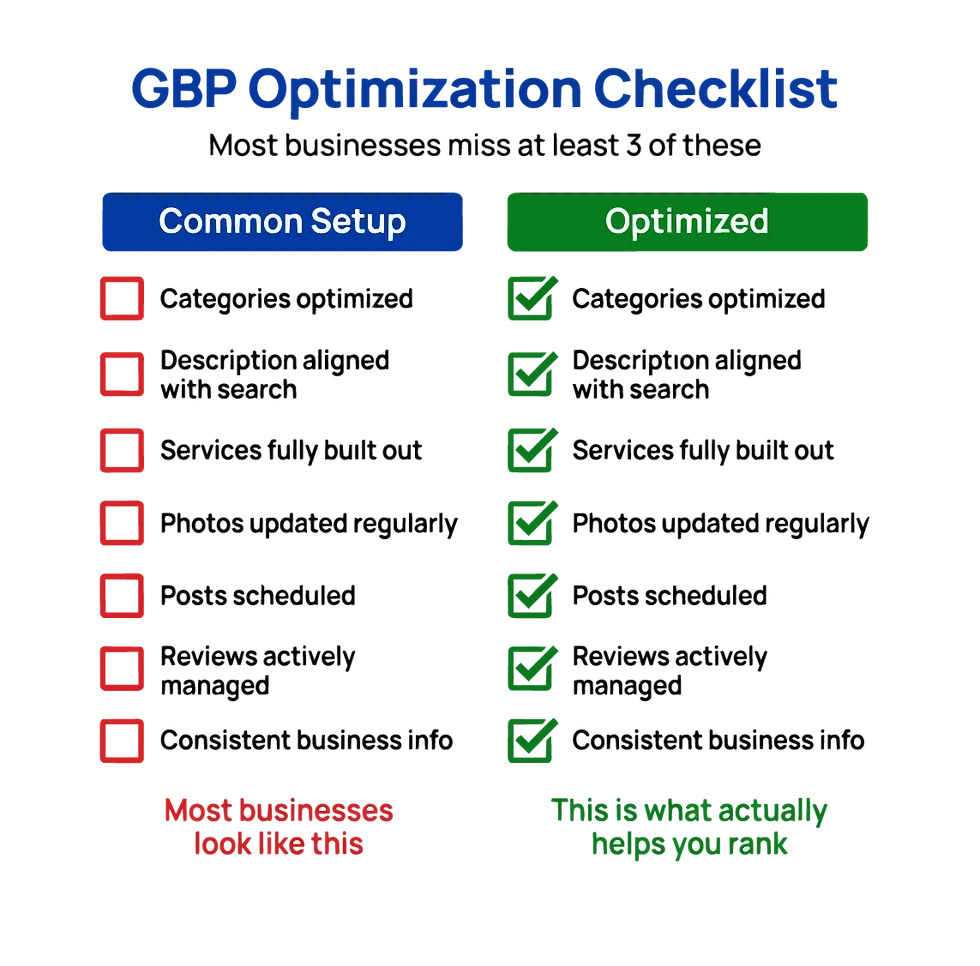
Use this checklist as a quick audit for your Google Business Profile:
Primary category matches core service
Secondary categories support real search terms
Description includes services + City (or region) + audience
Services section is detailed and keyword-aligned
Photos are updated and consistent with branding
Google Posts are being used consistently
Reviews mention services + location
Website and GBP information match exactly
Profile is being updated monthly (not set-and-forget)
Final thoughts on How to Optimize Your Google Business Profile
If your Google Business Profile isn’t generating leads, it’s rarely a “Google problem.”
It’s usually a clarity problem.
When your positioning, categories, services, and content all align, your visibility in Kelowna search doesn’t just improve, it compounds.
And that’s when your Google Business Profile stops being a listing and starts becoming a marketing tool.
Want help with this?
If you’re a Kelowna service-based business and your website or Google Business Profile isn’t bringing in consistent enquiries, I can help you tighten up your positioning and turn it into a lead-focused system.
👉 Book a website strategy call and we’ll go through what’s working for you and what’s not, so that you can start taking advantage of local SEO through your Google Business Profile

Beth Issler, Designer, & Website Strategist
With 10 years of experience working with small businesses, Beth Issler helps service professionals turn their expertise into a clear, credible online presence. As a web designer, brand designer, and website strategist, she creates brands and websites that help businesses attract better leads, build trust, and grow with confidence. Connect with Beth on LinkedIn or browse more articles on the blog.


Comments